
Family Age Timeline App
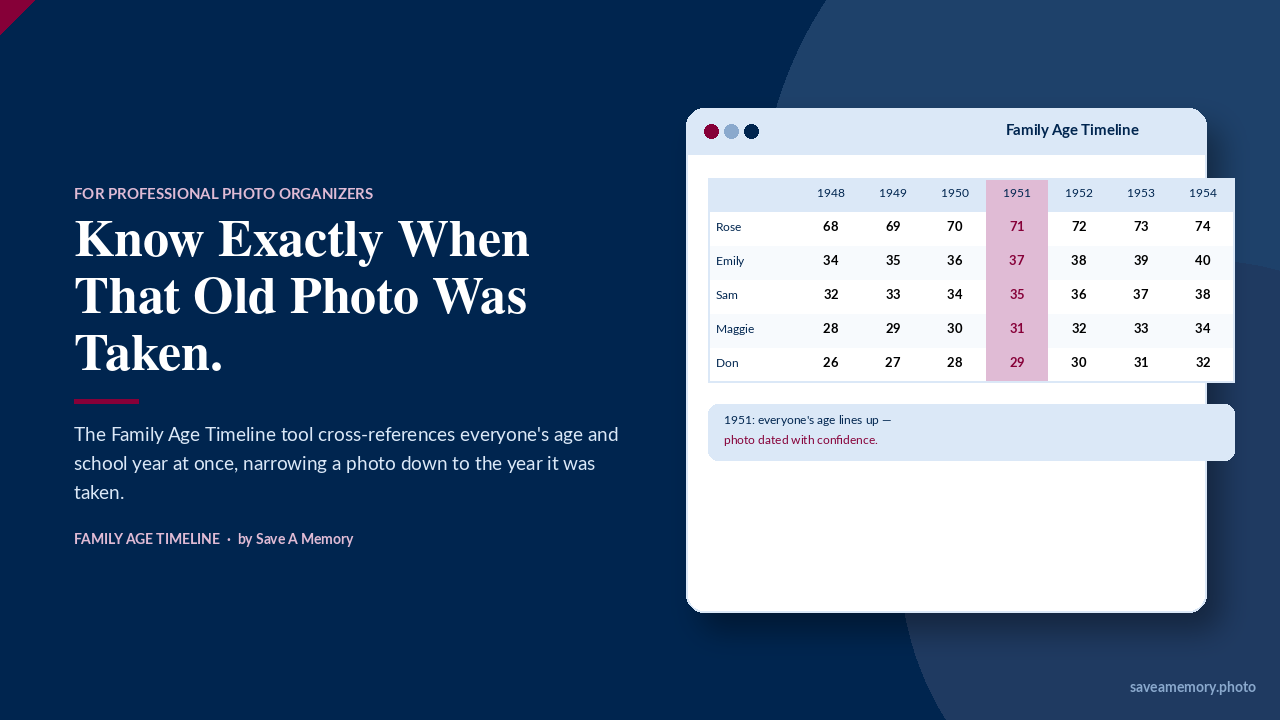
Stop Guessing When That Photo Was Taken.
The Family Age Timeline turns the birth dates you already have into an instant answer — the year, sometimes the exact months, an old photo was taken.
You Know This Feeling As A Business Owner or DIYer
You open up a box of photos with no dates on the back. There are three generations in one picture, and you're doing math in your head — was Grandma thirty here, or thirty-two? What year does that make it?
It's slow. You are trying to get close to the date you think it was taken. It's easy to second-guess yourself. And it's hard to hand a client a confident answer when you're not fully sure yourself.
You don't have to keep doing this by hand.
You'll Be Up and Running in Minutes.
No tech experience needed. If you can open a file and click a button, you can use this.
Download & Open
Purchase and download the file, then open it in Chrome, Safari, Firefox, or Edge. The app is ready to use immediately — no installation required.
Add Your Family
Enter a few birth dates for the family in this client's photos. The app does the age and school-grade math for you instantly.
Start Dating Photos
Jump straight into the Photo Date Finder, and save a project file for this client so you can pick up right where you left off.
One Tool, Built for This Exact Problem
The Family Age Timeline is a single file that lives right on your computer. You enter each family member's birth date once, and it does the math for you — instantly, and as many times as you need.
- See everyone's age — and school grade — for any year, at a glance
- Guess one person's age, and instantly see which year (sometimes which months) it falls in
- Have two or three people in the same photo? Enter your best guess for each, and narrow the date down to a single year
- Only know a grade, not an age? Look up "3rd grade" and see the matching year for everyone in the family at once
What You Get
No installation. No subscription. No learning curve. Open the file, and you're already working.
Works Anywhere You Already Work
One file, no software to install. Opens right in Chrome, Safari, Firefox, or Edge — on Mac or PC.
A Project for Every Client
Save each family as its own project file. Reopen it any time, or hand it off if you ever need to.
Age and Grade, Side by Side
Switch the whole timeline between ages and school grades, so you can work with whichever detail your client remembers.
Print-Ready and Spreadsheet-Ready
Print a clean report for client notes, or export the table to a spreadsheet in a click.
Who This Is For
This was built for professional photo organizers, genealogists, and family historians who date old photos as part of their work. If you've ever wished you had a faster, more confident way to answer "what year was this?" — this is for you.
What Customers Are Saying
"I've had scraps of paper helping me track my kids' ages and grade levels! This app does the math and lets me focus on curating the photos to create a legacy my family can truly use."
Get the Family Age Timeline
One purchase. Use it with every client you have, for as long as you're in business.
- Instant digital download
- Works on Mac and PC
- Unlimited client projects
- Built-in, editable Help guide
Get the Family Age Timeline
A note from Susan
I built this tool because I was living the problem myself.
Over the years I've helped hundreds of people get their photos and memories organized. And one of the most frustrating moments — for me and for my clients — was staring at a photo and not being able to pinpoint when it was taken.
I knew there had to be a better way than doing the math in my head every single time. So I built one.
The Family Age Timeline is simple, fast, and built around one idea: you shouldn't have to guess. You should be able to open a tool, enter what you know, and get a confident answer.
I hope it saves you as much time as it's saved me.
— Susan Wolak
Certified Professional Photo Manager · Forever Ambassador · Certified Mylio Photos Consultant
35+ years in technology · Longmont, Colorado
Questions
Do I need to install anything?
No. It's one file that opens right in your web browser — nothing to download and set up separately.
How do I open the file after I download it?
It arrives as a ZIP file. On a Mac, just double-click it in Finder to unzip — no extra software needed. On Windows, right-click it and choose "Extract All." Your computer already has everything built in.
Can I use this for more than one client?
Yes. Save a separate project file for each family, with no limit on how many you keep.
What if I'm not very tech-savvy?
If you can open a file and click a button, you can use this. It was built to feel simple, with a Help guide built right in.
Does it work on Mac and PC?
Yes — anywhere you have a current version of Chrome, Safari, Firefox, or Edge.
What's your refund policy?
All sales are final since this is an instant digital download. If something isn't working as described, reach out and we'll help make it right — see the Terms & Disclaimer for full details.